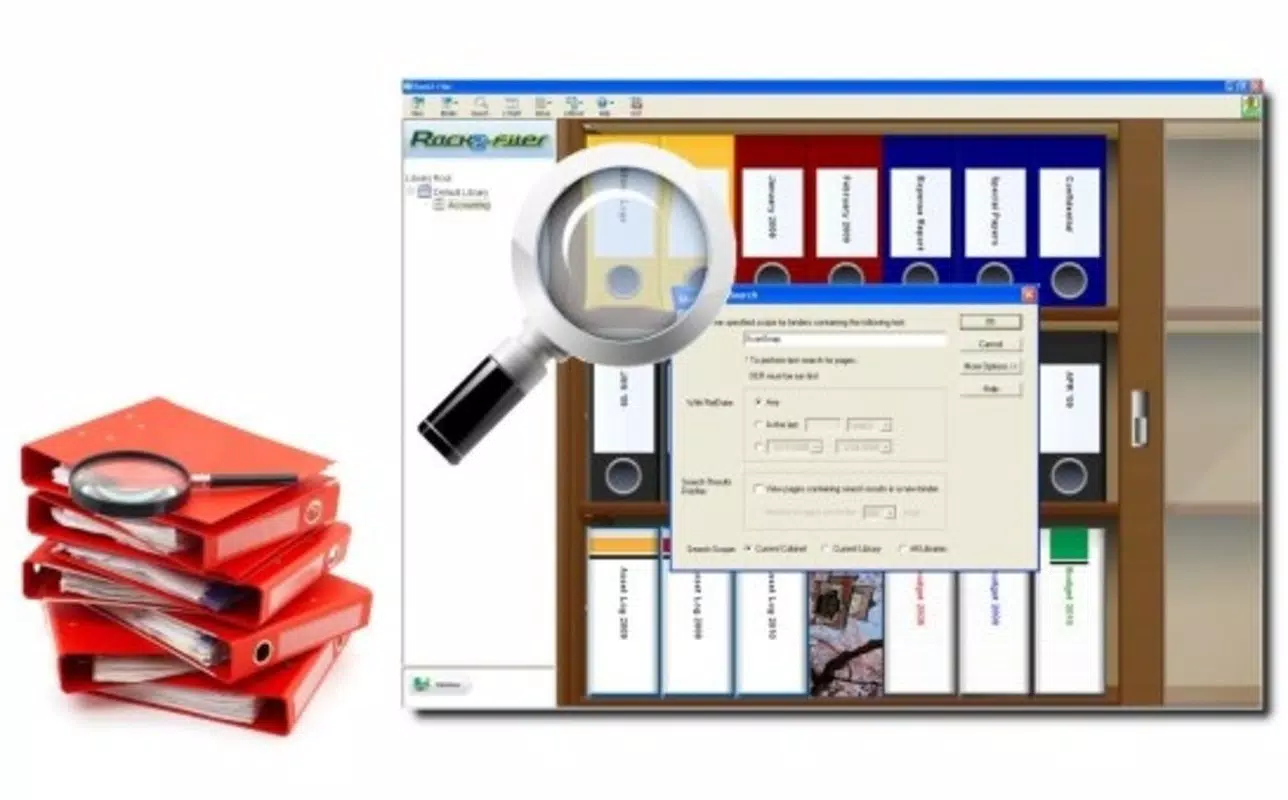

Download Rack2 Filer – document management, digital archiving, e-binder, scanner, paperless office, productivity tool, smartphone utility
Overview
Rack2 Filer is a productivity-focused mobile application designed to streamline digital document management, offering a bridge between physical and digital archiving systems. Targeted at users seeking efficient ways to organize, store, and retrieve digital documents, the app supports a paperless office environment by enabling users to manage large volumes of scanned files through a structured, intuitive interface. Its core purpose lies in simplifying everyday document handling tasks, particularly for professionals, administrative staff, and individuals managing personal records who rely on scanning tools.
The app’s design reflects a hybrid approach, blending familiar physical cabinet navigation with digital functionality. This hybrid model enhances usability by allowing users to interact with digital files as if they were stored in a real-world filing system, reducing the learning curve. While the developer, Fujitsu, is known for hardware and enterprise solutions, the app itself is positioned as a utility tool for document-centric workflows. Real-world use cases include organizing invoices, contracts, medical records, and personal documents, especially when paired with compatible scanning devices. The app’s ability to manage up to 2,520 e-binders, each capable of holding thousands of pages, underscores its scalability for both personal and professional use.
Although the developer did not provide additional technical details, Rack2 Filer’s long-standing presence since its release on March 27, 2008, indicates a stable and enduring product. Its continued availability on Android suggests ongoing support, particularly for users invested in Fujitsu’s ecosystem. In the broader app ecosystem, Rack2 Filer fills a niche for users who prioritize structured digital archiving over generic file storage, offering a specialized tool for those transitioning from paper-based systems.
Key Features & Functionality
- Intuitive User Interface: The interface blends physical filing cabinet metaphors with digital functionality, allowing users to navigate documents through a shelf-based layout. This design enables a tactile, familiar experience, making it easier for users to locate files without relying on complex search algorithms.
- E-Binder Capabilities: Rack2 Filer supports up to 2,520 e-binders, each capable of storing thousands of digital pages. This extensive capacity allows for highly organized document storage, ideal for users managing large volumes of scanned records across multiple projects or departments.
- Flexible Viewing Options: Users can switch between 1-Shelf and 3-Shelf views, adjusting the layout based on screen size and personal preference. The 3-Shelf view offers a more compact overview, while the 1-Shelf view provides greater visibility per document, enhancing accessibility and reducing navigation time.
- Sticky Notes and Dividers: The app allows users to add digital sticky notes for reminders or annotations and insert divider sheets to separate sections within an e-binder. These tools improve organization and help users quickly identify key documents or sections during retrieval.
- Scanner Compatibility: Designed primarily for Fujitsu’s ScanSnap series, Rack2 Filer is also compatible with other scanners and pre-scanned documents. This flexibility makes it a practical choice for users with mixed hardware setups or those who already maintain a digital archive.
For example, a small business owner can use Rack2 Filer to organize client contracts across multiple e-binders, using dividers to separate by year and sticky notes to flag pending renewals. Similarly, a home user managing medical records can categorize files by family member and use the 3-Shelf view for quick access during emergencies. These real-world applications highlight the app’s practicality and user-centric design.
Interface, UX & Performance
Rack2 Filer presents a clean, structured interface that mimics a physical filing cabinet, with visual cues that reflect shelves, binders, and document pages. The layout is consistent and predictable, supporting a smooth navigation flow that minimizes user confusion. Users can access e-binders, view documents, and apply organizational tools like sticky notes and dividers with minimal taps, contributing to an efficient workflow.
The app’s design emphasizes clarity and functionality over decorative elements, aligning with its productivity-focused purpose. Although the developer did not list formal performance metrics, the app’s lightweight size of 15.0 MB suggests it is optimized for efficient operation. It is expected to perform reliably on mid-range Android devices, though specific requirements were not disclosed. Responsiveness appears to be adequate, given the app’s long-term availability and continued functionality.
Stability is a notable strength, especially considering its release date in 2008. The app likely undergoes periodic updates to maintain compatibility with newer Android versions, though no update frequency was specified. Users can expect consistent behavior during document viewing, navigation, and basic editing tasks. While no performance benchmarks were provided, the app’s enduring presence suggests a reliable user experience for its target audience.
Platform Compatibility & Technical Requirements
Rack2 Filer is available exclusively on the Android platform. The current version is 2.1.2, with a file size of 15.0 MB, making it a lightweight download suitable for devices with limited storage. The app is offered free of charge, removing financial barriers to access.
The developer did not specify minimum OS requirements or compatibility details beyond the platform. As such, users should verify whether the app runs on their device’s Android version. Given its release date in 2008, the app may not support the latest Android versions without updates. However, its continued availability suggests ongoing maintenance, particularly for users within Fujitsu’s ecosystem.
Compatibility with various scanners, including Fujitsu’s ScanSnap series and other third-party devices, enhances its versatility. Users can import scanned documents directly or work with files already stored on their device. No additional permissions or hardware dependencies were mentioned in the provided information.
Pros and Cons
Pros
- Intuitive interface that mimics physical filing systems for easier navigation
- Supports extensive digital archiving with up to 2,520 e-binders
- Flexible viewing modes (1-Shelf and 3-Shelf) for personalized workflows
- Includes sticky notes and divider sheets for enhanced organization
- Compatible with multiple scanner types, including non-Fujitsu devices
- Lightweight size (15.0 MB) and free to download
Cons
- Specific OS requirements were not listed
- No information on update frequency or future development plans
- May not be compatible with the latest Android versions
- Limited visual customization options
- Developer did not provide detailed technical specifications
FAQ
Is Rack2 Filer compatible with my Android device?
The developer did not specify minimum OS requirements. Users should check compatibility with their device’s Android version.
Can I use Rack2 Filer without a Fujitsu scanner?
Yes, although the app is designed for Fujitsu’s ScanSnap devices, it is compatible with other scanners and pre-scanned documents.
Is Rack2 Filer safe to download and install?
As a free app from Fujitsu, it is considered secure. However, users should download it from official sources to avoid third-party modifications.
Does Rack2 Filer require an internet connection?
Based on available information, the app functions offline. It is designed for local document management and does not require constant connectivity.
How often is Rack2 Filer updated?
The update frequency was not disclosed. Users may need to manually check for updates in the app store.
Final Thoughts
Rack2 Filer stands out as a specialized tool for users committed to digital archiving and paperless workflows. Its unique blend of physical metaphor and digital functionality creates a user experience that is both intuitive and powerful. The app’s ability to manage vast document collections through e-binders, combined with practical features like sticky notes and dividers, makes it ideal for professionals and individuals alike who value organization and efficiency.
While the app’s age and lack of detailed technical information may raise concerns about modern compatibility, its continued availability suggests ongoing support. For users already invested in Fujitsu’s ecosystem or those seeking a lightweight, free solution for document management, Rack2 Filer offers a compelling value proposition.
Download Rack2 Filer now


